How to Create AI UGC Ads in 2026 (Step-by-Step)
Make your first AI UGC ad without showing your face: pick an angle, write a 20-second script, prepare product assets, generate, iterate, and follow the 2026 disclosure rules.
Most "how to make AI UGC" guides spend half their length explaining what UGC is. You already know — that's why you searched. So here is the whole process up front, then each step in enough detail to actually finish your first ad today.
TL;DR — the five-step pipeline:
- Pick an angle (review, unboxing, problem-solution, or before-after)
- Write a 20-second script in four beats: hook → demo → proof → CTA
- Prepare a clean product photo and an avatar reference
- Generate in AI UGC Studio with the prompt below, 9:16
- Iterate a few generations, cut 3 hook variants, label it as AI, and post
What makes an AI UGC ad work
Before the steps, the three things that decide whether the output converts:
- The first 3 seconds decide everything. If the opening line doesn't stop the scroll, nothing after it exists. The hook is a spoken line, not a title card.
- It must look like a person, not an ad. Handheld framing, natural light, real skin texture, a slightly imperfect room. Polished brand-ad visuals trigger the scroll-past reflex.
- One product, one point, one CTA. A 20-second UGC ad is not a feature list. It makes a single claim, proves it visually, and tells the viewer where to tap.
Every step below serves one of these three.
Step 1 — Pick your angle
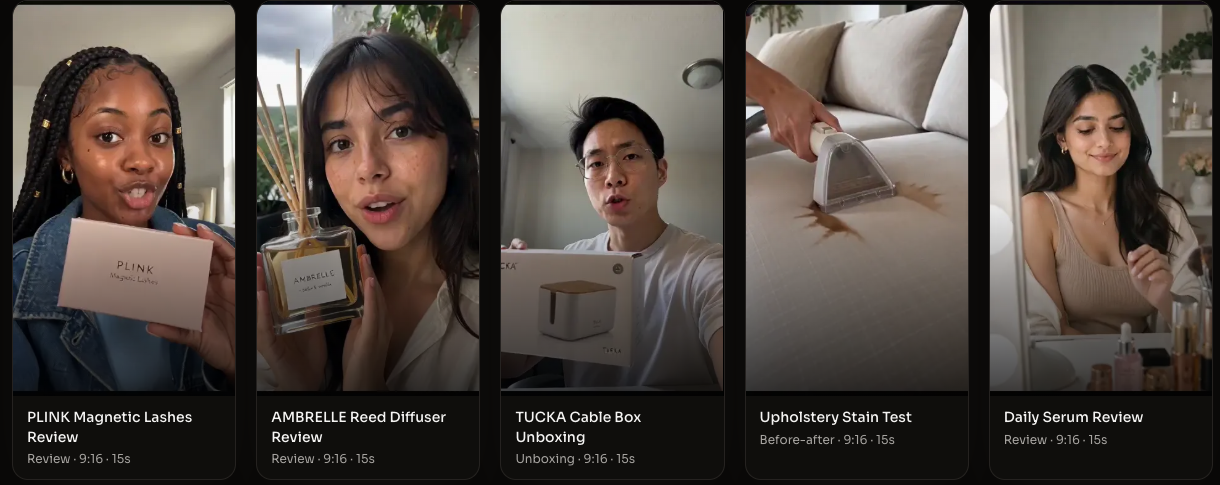
Four formats cover almost every AI UGC ad that performs. Pick one — mixing them is how scripts get muddy.
| Angle | The promise | Best for |
|---|---|---|
| Product review | "I tried it, here's my honest take" | Almost anything; the default choice |
| Unboxing | "Watch me open this" | Products with satisfying packaging or contents |
| Problem-solution | "If you struggle with X…" | Products that fix a visible annoyance |
| Before-after | "Look at the difference" | Beauty, cleaning, fitness, organization |
If you can't decide: product review. It's the most forgiving format and the easiest to script.
Step 2 — Write a 20-second script
High-performing UGC ads — human or AI — almost all follow the same four beats:
| Beat | Time | Job |
|---|---|---|
| Hook | 0–3s | Stop the scroll with one spoken line |
| Demo | 3–10s | Show the product in use |
| Proof | 10–16s | Show the result or the honest reaction |
| CTA | 16–20s | One call to action, pointed at the buy link |
Here's a complete example for an insulated water bottle — steal the structure, swap in your product:
Hook: "I've bought four water bottles this year and I finally get why this one is sold out." Demo: "It's 30 degrees outside, I filled this with ice at 8 AM — look. [tilts bottle to camera] Still full of ice." Proof: "And it doesn't sweat at all. My bag, my laptop, everything stays dry. I didn't expect to care this much about a bottle." CTA: "It's linked right there — get the big one, you'll thank me."
Three hook templates that work across products:
- The skeptic: "I did NOT expect this to actually work."
- The repeat buyer: "This is the third time I've ordered this."
- The replacement: "This replaced a $90 product and it's under $30."
Write your script out loud. If a sentence sounds like ad copy instead of something a person would say to a friend, rewrite it.
Step 3 — Prepare your product assets
You need one product photo. What makes a good one:
- Clean background — the product isolated, not lost in a scene
- Front-facing, well-lit — the generator needs to learn what it looks like
- No watermarks, no text overlays — they leak into the output
Where to get it: the brand's product page or media kit, your affiliate portal's asset pack, or a photo you take yourself against a plain wall. If you promote other people's products, their official listing images are usually the cleanest source.
Then add an avatar reference — a face and style you want consistent across videos. For UGC ads this is the recommended path: the generator builds the presenter around your reference, so the person feels deliberate rather than random. Any clear, front-facing, naturally-lit portrait works.
Step 4 — Generate in AI UGC Studio

-
Open AI UGC Studio and upload your product photo to the Product slot, then your Avatar reference.
-
Write your prompt. Mention the product with @Product, then describe the scene like you'd brief a creator. Adapt this:
UGC-style product review video. A creator in her 20s holds @Product in a bright kitchen, shot on a phone front camera, natural light, handheld feel, real skin texture, no filter. She says: "I've bought four water bottles this year and I finally get why this one is sold out." She tilts the bottle to the camera to show the ice inside, then gestures at her dry bag on the counter. Casual, like talking to a friend. Ends with the product centered and clearly visible.
-
Set Ratio to 9:16 — the ad format for TikTok, Reels, and Shorts.
-
Leave Model and Quality at the defaults for your first run. Hit Generate.
Step 5 — Review, iterate, and make variants
Here's what no competitor tutorial tells you: your first generation is rarely the keeper. Expect a few generations per usable clip — that's not a failure, it's the workflow.
When the output is off, don't regenerate blindly. Change one thing:
| If the problem is… | Change in the prompt |
|---|---|
| Product looks wrong | Sharpen the product description; re-upload a cleaner photo |
| Too polished, feels like an ad | Add "handheld, natural light, slight camera shake, no filter" |
| Presenter feels off | Specify age, setting, and energy ("tired mom, morning kitchen, low-key") |
| Hook doesn't land | It was never a visual problem — rewrite the first line of your script |
Once you have one keeper, make three hook variants: same demo and proof, three different opening lines. Creative testing is where AI UGC beats hiring creators — three variants cost you minutes, not three invoices.
AI disclosure and platform rules (2026)
This is the section most guides skip, and the one that decides whether your ads survive.
As of July 2026:
- TikTok requires a visible AI label on realistic synthetic media — AI-generated people, voices, and scenes. It also scans uploads and applies the label automatically if you don't, and retroactive flagging can hold distribution during your video's critical first hours.
- Meta requires an "AI info" label on realistic AI-generated video across Facebook and Instagram ads and organic posts.
- YouTube requires disclosure of realistic synthetic content at upload.
- The FTC treats AI-generated endorsements like human ones: a fake "customer" making claims a real customer couldn't verify is a deceptive endorsement, whatever tool made it.
The pragmatic position: label proactively, always. A visible "AI-generated" tag costs you, at worst, some reach. Getting auto-detected later costs distribution, and repeat violations cost the account. Build the label into your publishing checklist from day one — and keep your product claims honest, because the ad being AI-made doesn't lower the bar for what's true.
Rules change fast; check each platform's current policy before you spend real budget. This section reflects platform documentation archived in July 2026 and isn't legal advice.
FAQ
Can I create AI UGC ads for free?
Free tiers exist across tools, but they're product demos, not production tools — watermarks, low caps, or locked export. AI UGC Studio is pay-to-generate so every credit goes into output you can actually publish, with no watermark. See current plans for what a test budget looks like.
Do I need to show my own face?
No. That's the point of the format — the presenter is generated. You supply the product, the script, and the direction.
Which platforms can I run these ads on?
Anywhere short vertical video runs: TikTok (organic, ads, and TikTok Shop), Instagram Reels, YouTube Shorts, and paid placements on each. Generate 9:16 once and reuse everywhere — just follow each platform's AI labeling rules.
Can I use AI UGC ads for affiliate links?
Yes. Affiliate and brand-owned content follow the same disclosure rules — label the AI and keep claims accurate. Some affiliate programs have their own creative policies, so check the offer terms too.
How long should an AI UGC ad be?
15–30 seconds. Long enough for hook → demo → proof → CTA, short enough that nobody swipes. If you can't cut it below 30, your script is carrying two ideas — split it into two ads.
Ready to make your first one? Open AI UGC Studio, upload a product photo, paste the prompt from Step 4, and you'll have a reviewable clip in minutes.